Tensorify + Gmail
Build Gmail workflows that fit your stack.
Trigger on new Gmail messages, write the logic in Python, and send data to Gmail, webhooks, Sheets, Slack, or your own API—all on one inspectable canvas.
Workflow examples
Eight ways to connect Gmail
Start with a focused pattern, then tailor the nodes and credentials to your account.
New Gmail message
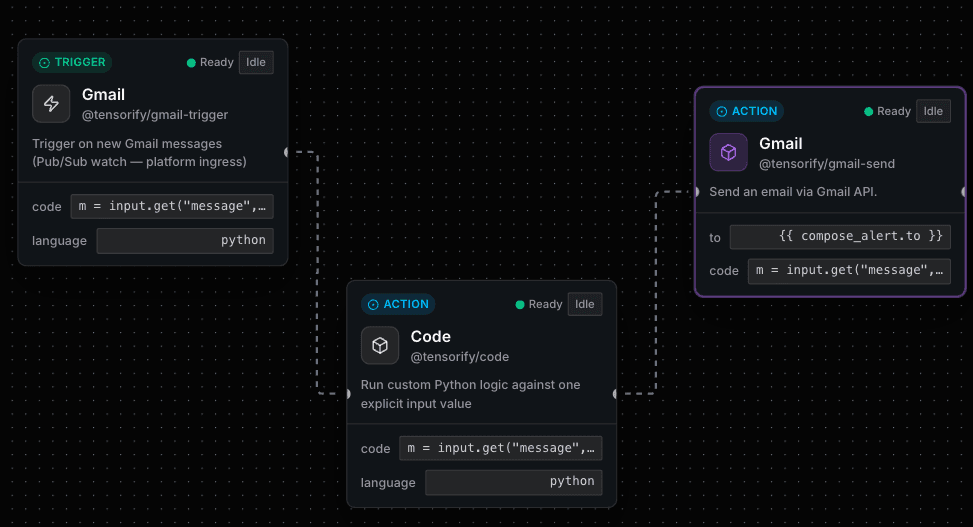
New email → code → Gmail alert
Watch for a new Gmail message, shape the data with Python, then send a focused Gmail notification.
Gmail trigger → Code → Gmail send
A Code node returns an alert payload
Code → Gmail alert
Compose a recipient, subject, and body in Python, then pass those fields directly into Gmail Send.
Code → Gmail send
New Gmail message
New email → webhook
Forward selected Gmail message data to your API or an external endpoint with a mapped HTTP request.
Gmail trigger → Code → HTTP request
Gmail message matching a query
Search match → webhook
Use Gmail search criteria to narrow the messages that enter your workflow, then post the result to a webhook.
Gmail trigger → Filter → HTTP request
New Gmail message with a label
Labelled email → Sheets
When an email is classified with a Gmail label, extract the useful fields and append them to a Google Sheet.
Gmail trigger → Code → Google Sheets
New Gmail message
Important email → Slack
Filter for messages that matter, format a concise summary, and deliver it to the right Slack channel.
Gmail trigger → Code → Slack
New Gmail message
New email → task
Extract action items from an incoming message and create a task in your chosen work-management workflow.
Gmail trigger → Code → Task action
Webhook event
Webhook → Gmail send
Receive a webhook from your product, map its data, and send a Gmail message through the connected account.
Webhook trigger → Code → Gmail send
Native Gmail nodes
Use Gmail as a trigger and action in the same workflow.
Code where it helps
Put custom matching and composition logic in a focused Code node.
Inspectable by design
Review node inputs and outputs before you deploy.